Why This Architecture Matters
This application is more than a browser chat demo. It is an enterprise agent application built on a route-driven integration stack, a Markdown agent blueprint, structured AI protocols, durable conversation state, and auditable tool execution. The same runtime can serve a web chat, voice channel, MCP clients, REST callers, and audit/admin users without duplicating the business logic.
The core advantages are:
- Protocol separation: AGUI, A2UI, MCP, A2A, REST, realtime voice, and SIP-style telephony each have a clear purpose instead of being folded into one opaque chat endpoint.
- Blueprint-driven behavior: the agent's instructions, tool bridge, defaults, and UI template guidance live in
src/main/resources/agents/calendar/agent.md, so behavior can evolve without rewriting route code. - Route-driven enterprise integration: Apache Camel routes expose the same calendar operations to browser chat, MCP, REST, and realtime flows.
- Schema-aware tool use: MCP
tools/listandtools/callallow the agent runtime to discover and execute controlled business tools instead of letting the model invent actions. - Long-running conversation support: conversation IDs, session IDs, audit events, and persistence settings allow multi-turn flows such as availability -> booking -> reschedule -> lookup -> cancellation.
- Shared context across channels: browser chat, voice transcripts, MCP calls, SIP-style phone turns, and A2A task handoffs can all resolve back to durable conversation context instead of starting from scratch on every channel.
- Operational visibility: audit endpoints and admin MCP tools expose conversation history, tool activity, model/provider metadata, and replay-friendly transcript views.
- Channel reuse: the same calendar agent can be used by text chat, voice/realtime sessions, and programmatic clients.
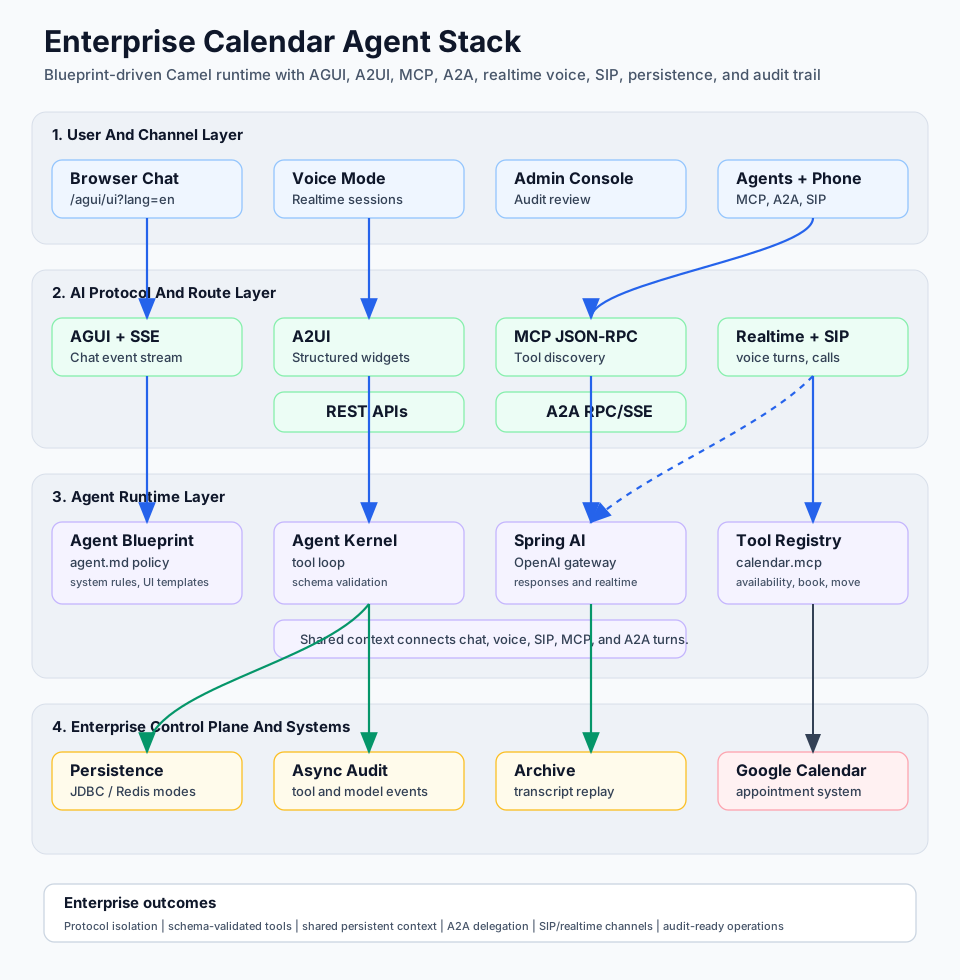
Enterprise Stack At A Glance
| Layer | Technology Used Here | Enterprise Role |
|---|---|---|
| Runtime | Spring Boot 3.5.12, Java 21, Undertow | Runs the application as a production-style service on port 8080. |
| Integration | Apache Camel 4.15.0 YAML routes | Keeps HTTP, MCP, AGUI, realtime, admin, and calendar flows route-driven and testable. |
| Agent runtime | camel-agent-core, camel-agent-spring-ai, camel-agent-starter, camel-agent-persistence-dscope |
Loads the blueprint, invokes the model, validates tools, persists events, and wires runtime processors. |
| Agent blueprint | agents/calendar/agent.md |
Defines system rules, defaults, concrete calendar behavior, tool bridge metadata, and A2UI response templates. |
| Browser protocol | AGUI over HTTP/SSE | Streams assistant responses and structured events into the web chat. |
| Structured UI | A2UI templates | Renders slots, forms, confirmations, search results, and action cards as first-class UI, not just prose. |
| Tool protocol | MCP JSON-RPC | Exposes tools/list and tools/call, resources/list, and resources/read for controlled tool discovery and invocation. |
| Agent-to-agent protocol | A2A RPC/SSE and agent cards | Allows this agent pattern to expose capabilities to other agents or delegate work to peer agents with task correlation. |
| Voice protocol | Realtime session init/token/event routes | Prepares browser voice sessions and routes final transcripts back through the same agent flow. |
| Telephony protocol | SIP-style ingress and outbound call contracts | Lets phone calls reuse the same conversation, realtime transcript, persistence, and audit model. |
| Persistence and audit | DScope persistence facade, JDBC defaults, async audit queues | Stores conversation events, task/tool diagnostics, and replayable history. |
| Business system | Google Calendar | Provides the appointment availability, booking, move, search, clone, and delete operations. |
Agent Blueprint Technology
The calendar agent is defined as a Markdown blueprint rather than a hardcoded Java class. The product guide describes this model as blueprint-driven Apache Camel agent orchestration: the runtime loads a Markdown file, extracts the ## System instructions, parses fenced YAML blocks, registers tools, validates schemas, and then runs the agent loop through the Camel agent: endpoint.
In this project, the active blueprint is configured in application.yaml as:
agent:
  blueprint: ${AGENT_BLUEPRINT:classpath:agents/calendar/agent.md}
The blueprint gives the enterprise team a single governance point for:
- booking-flow policy, including when to call availability, booking, search, move, clone, or delete operations
- language behavior, with English by default and Slovak responses when the user writes in Slovak
- date and timezone rules for Europe/Bratislava
- provider defaults such as Google Calendar, service duration, calendar ID, and timezone
- safe destructive behavior, including confirmation expectations for cancellation
- structured UI output rules for
calendar-slots,booking-confirmed,move-confirmed,cancel-confirmed,appointment-found, andsearch-results - voice-transcript interpretation, so short spoken turns like "yes", "cancel it", or "same time tomorrow" are resolved against conversation context
That matters in enterprise settings because business policy and tool-selection rules can be reviewed as an artifact. The implementation team can test the blueprint and the route contracts independently, while the service desk or domain team can reason about the appointment policy in plain Markdown.
Tools And Business Capabilities
The visible blueprint declares a seed tool named calendar.mcp:
tools:
  - name: calendar.mcp
    description: Calendar MCP bridge (runtime discovers concrete MCP tools via tools/list)
    endpointUri: mcp:http://localhost:8080/mcp
The runtime uses that bridge to discover and call concrete MCP calendar operations. The business actions surfaced through the bridge and routes are:
calendar.listAvailabilityfor free slotscalendar.bookAppointmentfor new bookingscalendar.searchAppointmentsfor email, phone, name, or query lookupcalendar.moveAppointmentfor reschedulingcalendar.deleteAppointmentfor cancellationcalendar.cloneAppointmentfor duplicating an appointment into another time
The same capabilities are also exposed through route-driven REST endpoints under /api. This is important because the enterprise integration boundary is not tied to one UI.
AI Protocols Used By The Agent
AGUI For Browser Chat
AGUI is the browser conversation transport. The English chat page posts user requests to /agui/agent, and the route agui-agent-post-sse wraps the request, runs the AGUI processors, invokes the agent pre-run path, and streams the response back to the transcript. The app advertises itself as an SSE-capable AGUI bridge with A2UI enabled.
A2UI For Enterprise-Grade UI Actions
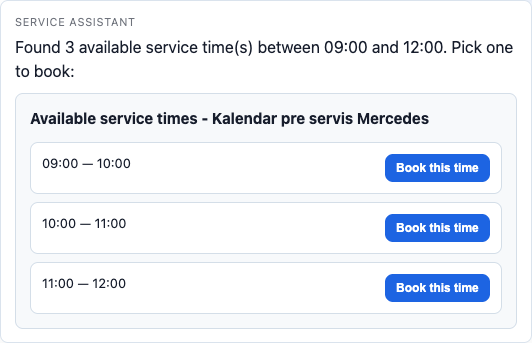
A2UI is the structured UI layer. Instead of returning plain text such as "I found a slot", the agent can return a template payload that the browser renders as a slot picker, booking form, confirmation card, search-result card, or cancellation confirmation.
MCP For Tool Discovery And Controlled Invocation
MCP is the tool protocol used by the calendar bridge. The local MCP endpoint supports initialize, ping, tools/list, tools/call, resources/list, and resources/read. The route validates the JSON-RPC envelope, guards request size, applies rate limiting in admin contexts, and dispatches tool calls to calendar processors. This keeps model-controlled action execution behind a protocol boundary with schemas and server-side validation.
Realtime Session APIs For Voice
The project exposes three browser voice routes:
POST /realtime/session/{conversationId}/initPOST /realtime/session/{conversationId}/tokenPOST /realtime/session/{conversationId}/event
These routes let the browser initialize voice context, request a realtime token, and send final transcript events back through the same calendar agent.
SIP And Telephony Integration
The broader Camel agent platform described in the product guide supports SIP-style ingress and outbound support call patterns. In that model, provider-specific telephony adapters normalize phone events into session start, turn, and end contracts, while final voice transcripts are routed back through the same realtime and agent: orchestration used by browser voice.
A2A Protocol Scenarios
A2A is the agent-to-agent protocol scenario for exposing local plans as reachable agents and calling peer agents through protocol endpoints. The enterprise value is correlation. A2A task IDs, parent/root conversation IDs, and audit chain views allow operators to understand not just what one agent said, but how multiple agents participated in the same business process.
REST For System Integration
REST endpoints under /api provide deterministic integration access to calendar operations.
Admin MCP And Audit APIs
The admin surface exposes POST /mcp/admin, GET /audit/conversations, and GET /audit/conversation/view.
Long-Running Agent Flows, Persistence, And Audit Trail
The verified browser run is a small example of a long-running agent flow. The user starts with an availability question, clicks into a structured booking form, confirms the appointment, reschedules the same event, finds it by email, cancels it, and verifies that lookup no longer returns it. That lifecycle depends on the agent preserving context across turns.
This project enables that through configuration such as:
agent:
  persistence-mode: ${AGENT_PERSISTENCE_MODE:jdbc}
  conversation:
    persistence:
      enabled: ${AGENT_CONVERSATION_PERSISTENCE_ENABLED:true}
  audit:
    granularity: ${AGENT_AUDIT_GRANULARITY:info}
    async:
      enabled: ${AGENT_AUDIT_ASYNC_ENABLED:true}
      queue-capacity: ${AGENT_AUDIT_ASYNC_QUEUE_CAPACITY:4096}
Route-Driven Runtime Flow
flowchart LR
  A[Customer browser, voice, SIP, or peer agent] --> B[AGUI, realtime, SIP, MCP, or A2A route]
    B --> C[Agent runtime processors]
    C --> D[Markdown blueprint]
    D --> E[Agent kernel]
    E --> F[MCP tools/list and tools/call]
    F --> G[Calendar Camel routes]
    G --> H[Google Calendar]
    E --> I[A2UI response payload]
    I --> A
    E --> J[Persistence and async audit trail]
  J --> K[Audit UI, admin MCP, and chain views]
Scope Of The Live Walkthrough
This article documents a live end-to-end run of the English customer chat application on port 8080 in the built-in browser. The verified flow covers:
- finding service availability
- booking an appointment
- moving the same appointment
- finding appointments by email
- canceling the appointment
- confirming that the canceled appointment is no longer returned by search
Environment
- App URL:
http://localhost:8080/agui/ui?lang=en - Runtime: Spring Boot 3.5.12 on Java 21
- Routing: Apache Camel 4.15.0 YAML routes
- UI mode used in this walkthrough: AGUI text chat with A2UI widgets
Startup
Start the app on port 8080 with the guarded launcher:
bash ./scripts/run-agent-local.shVerified Test Data
- Customer name:
Roman Tester - Email:
roman.tester+agui-doc@example.com - Phone:
+421900123456 - Vehicle:
2021 Mercedes-Benz C 220d - Service:
Annual Mercedes maintenance - Verified event ID:
p5api1bt92fivoe73g6fp508k4
Step-By-Step Walkthrough
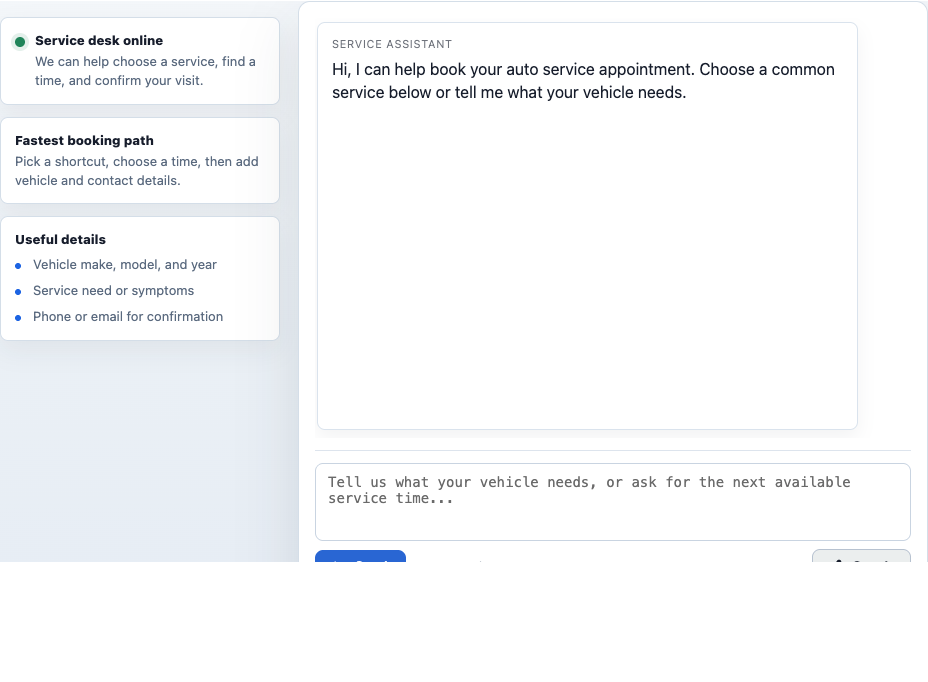
1. Open the English customer chat
Open the AGUI page at http://localhost:8080/agui/ui?lang=en.
2. Find availability
Prompt used: Find available appointments tomorrow between 9:00 and 12:00 for Mercedes service.
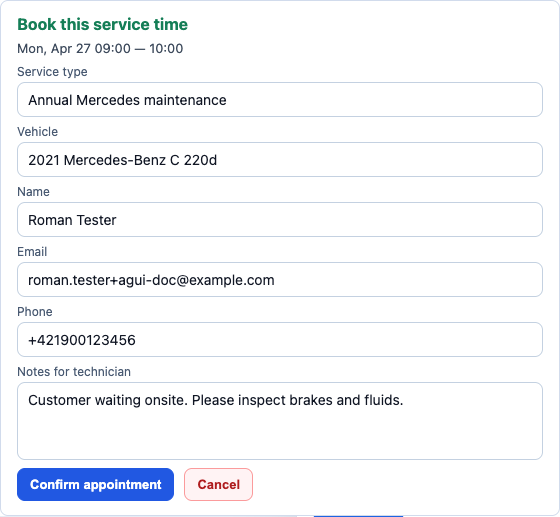
3. Open and fill the booking form
Action used:
- Click
Book this timefor the09:00 — 10:00slot. - Fill the booking form with the verified test data above.
- Keep the note
Customer waiting onsite. Please inspect brakes and fluids.
4. Confirm the booking
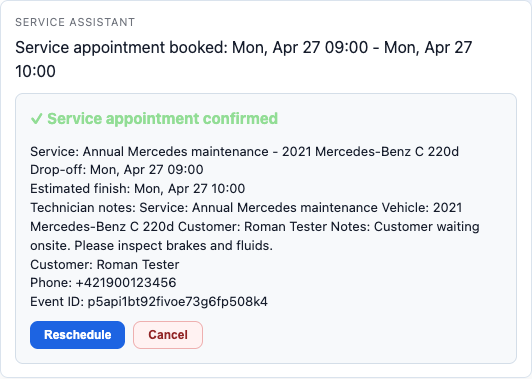
Action used: Click Confirm appointment.
5. Reschedule the appointment
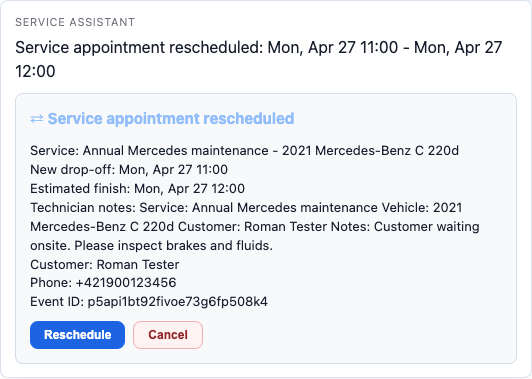
Action used:
- Click
Rescheduleon the confirmation widget. - Send the generated prompt as
Reschedule service appointment p5api1bt92fivoe73g6fp508k4 to tomorrow at 11:00.
6. Find the appointment by email
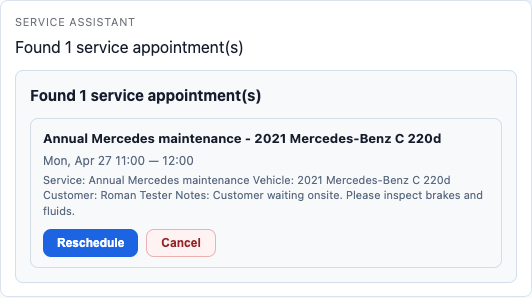
Prompt used: Find my appointments for roman.tester+agui-doc@example.com.
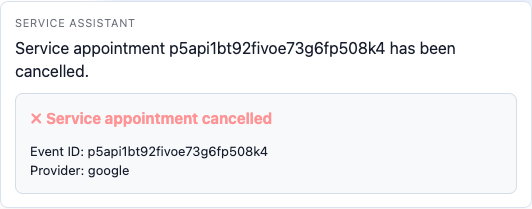
7. Cancel the appointment
Action used:
- Click
Cancelon the found appointment. - Send the generated prompt as
Cancel service appointment p5api1bt92fivoe73g6fp508k4. Customer no longer needs the visit.
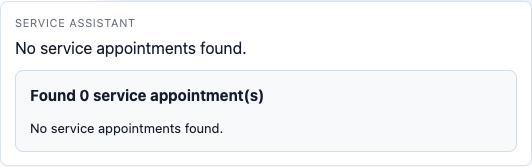
8. Verify the appointment no longer appears in search
Prompt used: Find my appointments for roman.tester+agui-doc@example.com.
What This Confirms
- English AGUI chat renders correctly on the live
8080runtime. - A2UI widgets are delivered and rendered inline in the transcript.
- The full appointment lifecycle works from the chat UI without switching tools.
- Search by email works in the same customer-facing flow.
- Cancelation is reflected in a subsequent lookup.
Conclusion
The English customer chat app on 8080 completed the full live lifecycle successfully: availability, booking, reschedule, find-by-email, cancel, and post-cancel verification. The larger enterprise value is the architecture behind that flow: a Markdown blueprint governs the agent, MCP controls tool discovery and execution, Camel routes isolate business operations, AGUI/A2UI provide a structured browser experience, realtime and SIP-style channels can reuse the same context, A2A can connect the agent to broader multi-agent workflows, and persistence plus audit trail make the entire process observable after the fact.